
How to get Infinite Spirits in Inazuma Eleven Victory Road (Cheat Engine Guide)
Welcome, Inazuma fan! Today, I’m going to show you how to get infinite spirits in Inazuma Eleven: Victory Road using Cheat Engine. With this method, you’ll be able to get spirits of every rarity (Common, Growing, Advanced, Top, Legendary, and Fabled/Basara) instantly, without wasting hours farming them in matches.
Note: This method is only valid for the PC version and modded Nintendo Switch versions (or emulators)
How to set up Cheat Engine
To get unlimited spirits, Cheat Engine is our key tool. However, if you are playing on PC, Steam's Easy Anti-Cheat (EAC) will prevent the program from detecting the game's memory values.
To fix this, you have two options:
- Follow the steps in our tutorial to get infinite Spirit Beans, where we explain in detail how to download and apply the necessary bypass.
- Quick option: if you already know the drill, search the internet for something like "disable EAC Inazuma Eleven Victory Road". You just need to download the modified
.exefile and paste it into the pathC:\SteamLibrary\steamapps\common\INAZUMA ELEVEN Victory Road, replacing the original one 🤫.
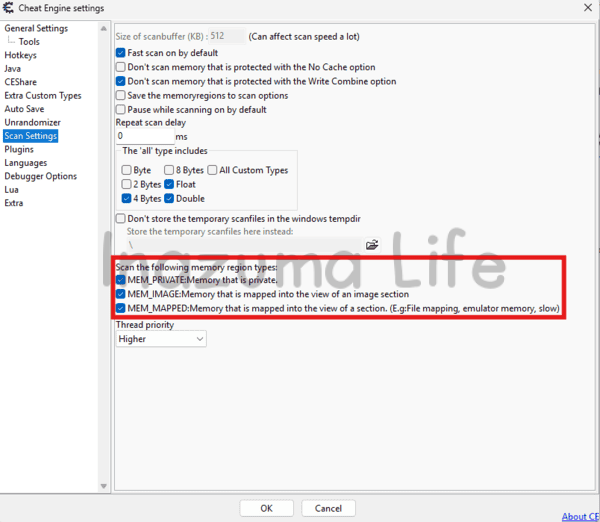
Also, remember that in the program's settings (Edit → Settings), you must have the following options checked to allow memory scanning; otherwise, the values will not appear.
Memory Structure: How are Spirits saved?
Before we jump into searching for values like crazy, it's essential to understand how the game stores information. In Inazuma Eleven: Victory Road, spirits aren't isolated values; they are grouped in a data "string" within the memory. If you locate one piece of data, you locate the rest.
The key concept: Little Endian Notation
Before looking at the example, you must know that the game uses the Little Endian format. This means that bytes are stored in reverse order.
Example: If you have 1 spirit (which in 2-byte hexadecimal notation would be
00 01), in the memory you will see it written backwards:01 00. If you have 23 spirits (hexadecimal00 17), in Cheat Engine it will appear as17 00.
Visual Memory Map
Take a look at the image below. At the top, you can see the spirits we have in the game, and at the bottom, exactly how they show up in the Cheat Engine editor (Hex View). Each spirit type takes up 2 bytes and they follow a strict order:
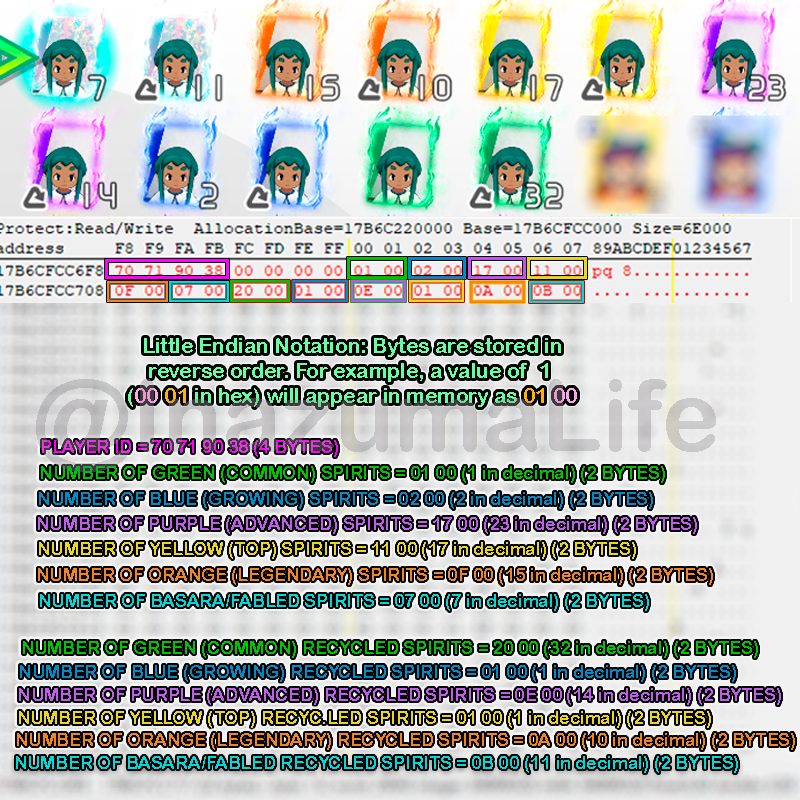
The exact sequence shown in the image is as follows:
- PLAYER ID: The first 4 Bytes (in pink) identify the player. We don't know what these specific values are, but as you’ll soon see, we won't actually need them for this method.
- NORMAL SPIRITS (2 Bytes each):
- Green (Common): In the example,
01 00(1 spirit). - Blue (Growing):
02 00(2 spirits). - Purple (Advanced):
17 00(23 spirits). - Amarillos (Estrella):
11 00(17 spirits). - Orange (Legendary):
0F 00(15 spirits). - Basara (Fabled)
07 00(7 spirits).
- Green (Common): In the example,
- RECYCLED SPIRITS (2 Bytes each):
Right after the normal Basaras, the exact same sequence begins for the recycled ones:
- Recycled Green: In the example,
20 00(32 spirits). - Recycled Blue: Follows the sequence right after green.
- Recycled Purple: Follows the sequence.
- Recycled Yellow: Follows the sequence.
- Recycled Orange: Follows the sequence.
- Recycled Basara: The last value of the block.
- Recycled Green: In the example,
With all this in mind, we can see that the exact structure the spirits follow in the memory is as follows: PLAYER_ID (4 Bytes) + 2 variable Bytes + 00 00 (Separator) + 6 normal spirit types + 6 recycled spirit types. Remember that each spirit amount takes up 2 bytes.
How to search and edit values in Cheat Engine
Now that we know how they are organized, there's no need to search for values one by one. We are going to use an "Array of Byte" scan to find the complete data block for the player we want by searching for the following:
?? ?? ?? ?? ?? ?? 00 00 AA AA BB BB CC CC DD DD EE EE FF FF GG GG HH HH II II JJ JJ KK KK LL LL
What do these values mean?
?? ?? ?? ?? ?? ?? 00 00: Variable values of the Player ID and memory separators that we must ignore during the search.-
NORMAL SPIRITS:
AA AA: Number of Green Spirits (Common)BB BB: Number of Blue Spirits (Growing)CC CC: Number of Purple Spirits (Advanced)DD DD: Number of Yellow Spirits (Top)EE EE: Number of Orange Spirits (Legendary)FF FF: Number of Basara Spirits (Fabled)
-
RECYCLED SPIRITS ♻️:
GG GG: Number of Recycled Green SpiritsHH HH: Number of Recycled Blue SpiritsII II: Number of Recycled Purple SpiritsJJ JJ: Number of Recycled Yellow SpiritsKK KK: Number of Recycled Orange SpiritsLL LL: Number of Recycled Basara Spirits
Practical Example: Getting infinite spirits step-by-step
Now that we understand the theory, let's move on to the practical part (at last!). In my case, I want to get infinite spirits for Rhine (a player from Diamond Dust). These are the spirits I currently have in my inventory:
- Green Spirits (Common) 1
- Yellow Spirits (Top): 1
- Orange Spirits (Legendary): 1
- All other rarities: 0
Note: It is absolutely necessary to have at least one spirit of that player in your inventory. Otherwise, the method won't work because the data won't be registered in your memory. To do it without having any, you would have to manually add the player IDs—something I might explain in the future 😉

Once we know the amount of spirits we have, we need to open Cheat Engine and do the following:
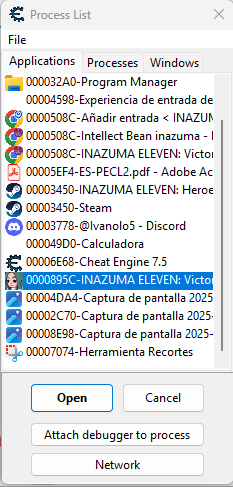
- Click on the "magnifying glass" button (top left) and select Inazuma Eleven: Victory Road from the process list
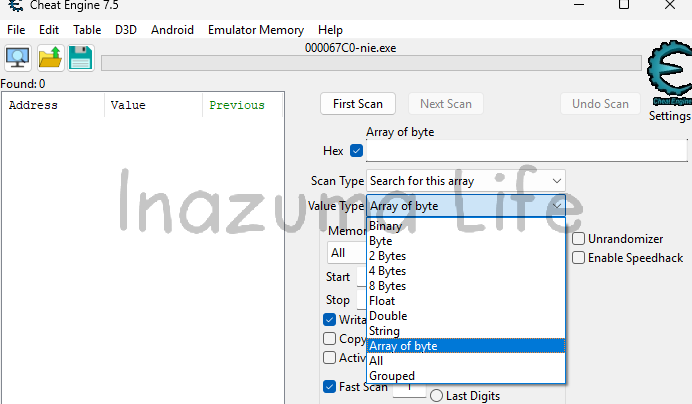
- In the Value Types box, select Array of Byte (which is set to 4 bytes by default when opening the program). You must also check the Hex box located to the left of the search bar where we'll enter the text (right above Scan Type); otherwise, you won't find anything during the search.
-
Once everything is correctly set up, we'll proceed with the search. We'll use the code we discussed earlier as our base:
?? ?? ?? ?? ?? ?? 00 00 AA AA BB BB CC CC DD DD EE EE FF FF GG GG HH HH II II JJ JJ KK KK LL LLFor the search to be effective, we will replace the letters with the actual amount of spirits we currently have, converting them to hexadecimal (2 bytes) and applying Little Endian notation (reverse order). In our practical example, the conversion process would be as follows:
- Green Spirits (AA AA): 1 (decimal) → 00 01 (Hex) → 01 00 (Little Endian).
- Yellow Spirits (DD DD): 1 (decimal) → 00 01 (Hex) → 01 00 (Little Endian).
- Orange Spirits (EE EE): 1 (decimal) → 00 01 (Hex) → 01 00 (Little Endian).
Since we don't have any other spirit types in this case (neither normal nor recycled), we will fill the remaining positions with
00 00. The final sequence to search for in Cheat Engine looks like this:?? ?? ?? ?? ?? ?? 00 00 01 00 00 00 00 00 01 00 01 00 00 00 00 00 00 00 00 00 00 00 00 00 00 00
-
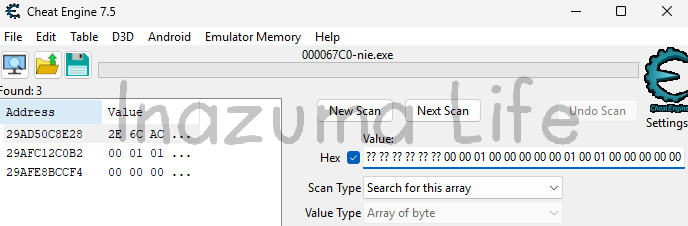
Once we search, we can see that more than one result appears. This is normal when using wildcards. While the first result is usually the correct one, let's see how to identify ours in a foolproof way.

Note: In many cases, only one result will appear (if this is your case, you can skip the next step and go directly to the memory viewer), but I wanted to explain this scenario in case you find it a bit "harder" to locate.
-
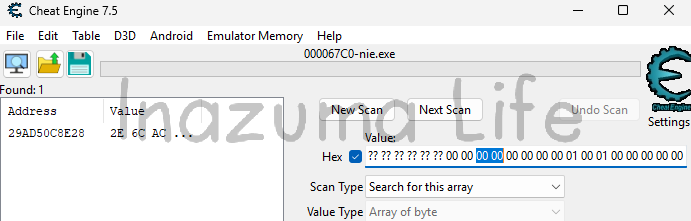
To successfully reduce the number of results and find the exact memory address, what we need to do is summon a spirit from those you already have to trigger a change in the memory. In my case, I summoned the green spirit (common), which means we went from having 1 to having 0; in other words, the value changed from 01 00 to 00 00.
Once that change has been made in the game, we update the corresponding value in the Cheat Engine search bar and click on Next Scan. Now, as you can see in the image, only a single result will appear, which corresponds exactly to our player:

-
Once that's done, click on it and press Ctrl+B (or right-click -> Browse this memory region); this allows us to dive into the "inner workings" of the game and modify the values directly.

-
Do you remember the structure the spirits followed in the memory?
Before touching anything, let's compare what we see in the viewer with our original template to know exactly what we are editing:
?? ?? ?? ?? (PLAYER_ID) ?? ?? 00 00 AA AA BB BB CC CC DD DD EE EE FF FF GG GG HH HH II II JJ JJ KK KK LL LLn the memory viewer, our player's data looks as follows:
2E 6C AC A4 00 00 00 00 00 00 00 00 00 00 01 00 01 00 00 00... -
Now we're gonna replace the values of AA AA, BB BB , and the rest with the ones we want. In this example, we want to have 999 normal spirits and 300 of each recycled spirit. To do this, we perform the conversion:
- For 999 spirits: In 2-byte hexadecimal, it is
03 E7, but since we use Little Endian notation, we'll write it backwards: E7 03. We will apply this from AA AA to FF FF. - For 300 spirits: In 2-byte hexadecimal, it is
01 2C. When reversing it for Little Endian, we get: 2C 01. This applies from GG GG to LL LL.
Once the block is edited in the viewer, the final code should look like this:
2E 6C AC A4 00 00 00 00 E7 03 E7 03 E7 03 E7 03 E7 03 E7 03 2C 01 2C 01 2C 01 2C 01 2C 01 2C 01
- For 999 spirits: In 2-byte hexadecimal, it is
-
To check that the spirit amount has been updated correctly, you must switch between the spirit tabs (meaning, through the spirit tabs for each game) or exit to the Chronicles menu and re-enter; you will see that you now have 999 of each rarity and 300 recycled ones.



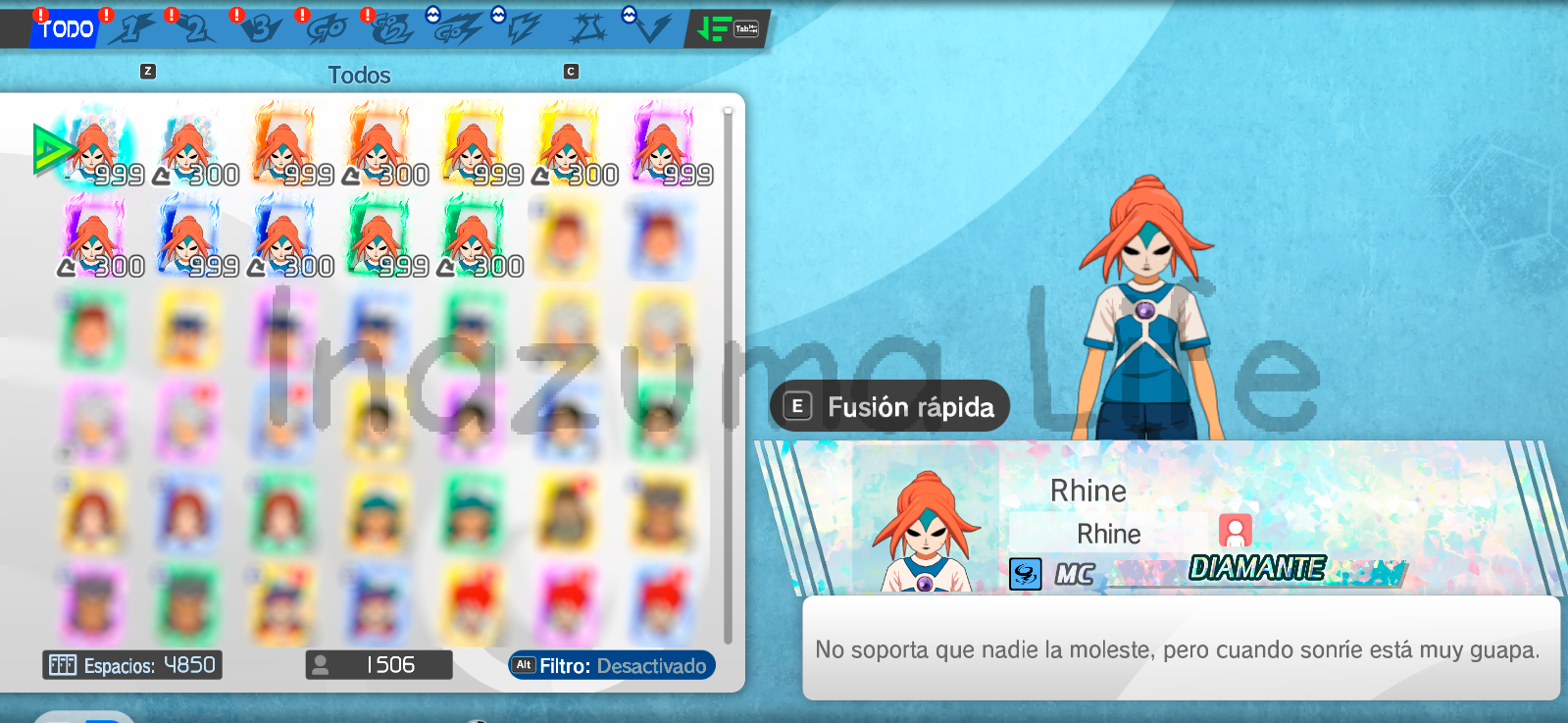
- Now we can try to summon one of them, for example, a Fabled (Basara) spirit, and we can see that it has indeed been saved correctly in our team.
More Inazuma Eleven Victory Road Guides
If you enjoyed this method and want to keep exploring the possibilities Cheat Engine offers to modify other aspects of Inazuma Eleven: Victory Road, feel free to check out our other tutorials:
Remember that modifying the game's memory is a powerful tool, but it should be used wisely. Thanks for reading, and see you soon! ⚽⚡

Leave a Reply
 Español Español
  English (UK)
 Italiano
 Deutsch
 Français
 日本語
日本語
Related posts