

How to get Infinite Spirits in Inazuma Eleven Victory Road (Cheat Engine Guide)
Welcome, Inazuma fan! Today, I’m going to show you how to get infinite spirits in Inazuma Eleven: Victory Road using Cheat Engine. With this method, you’ll be able to get spirits of every rarity (Common, Growing, Advanced, Top, Legendary, and Fabled/Basara) instantly, without wasting hours farming them in matches.
Note: This method is only valid for the PC version and modded Nintendo Switch versions (or emulators)
How to set up Cheat Engine
To get unlimited spirits, Cheat Engine is our key tool. However, if you are playing on PC, Steam's Easy Anti-Cheat (EAC) will prevent the program from detecting the game's memory values.
To fix this, you have two options:
- Follow the steps in our tutorial to get infinite Spirit Beans, where we explain in detail how to download and apply the necessary bypass.
- Quick option: if you already know the drill, search the internet for something like "disable EAC Inazuma Eleven Victory Road". You just need to download the modified
.exefile and paste it into the pathC:\SteamLibrary\steamapps\common\INAZUMA ELEVEN Victory Road, replacing the original one 🤫.
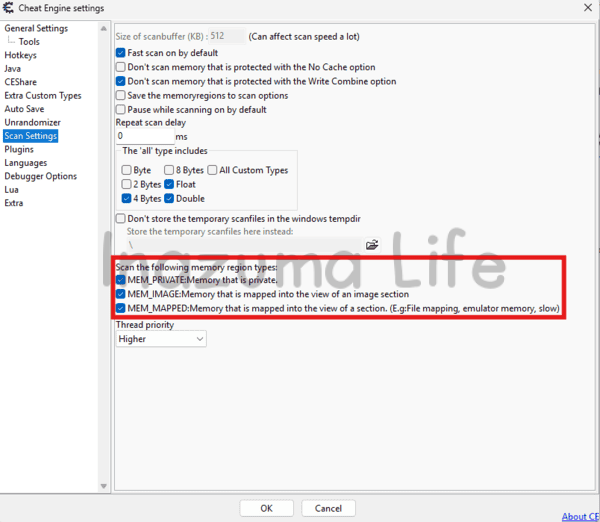
Also, remember that in the program's settings (Edit → Settings), you must have the following options checked to allow memory scanning; otherwise, the values will not appear.
Memory Structure: How are Spirits saved?
Before we jump into searching for values like crazy, it's essential to understand how the game stores information. In Inazuma Eleven: Victory Road, spirits aren't isolated values; they are grouped in a data "string" within the memory. If you locate one piece of data, you locate the rest.
The key concept: Little Endian Notation
Before looking at the example, you must know that the game uses the Little Endian format. This means that bytes are stored in reverse order.
Example: If you have 1 spirit (which in 2-byte hexadecimal notation would be
00 01), in the memory you will see it written backwards:01 00. If you have 23 spirits (hexadecimal00 17), in Cheat Engine it will appear as17 00.
Visual Memory Map
Take a look at the image below. At the top, you can see the spirits we have in the game, and at the bottom, exactly how they show up in the Cheat Engine editor (Hex View). Each spirit type takes up 2 bytes and they follow a strict order:
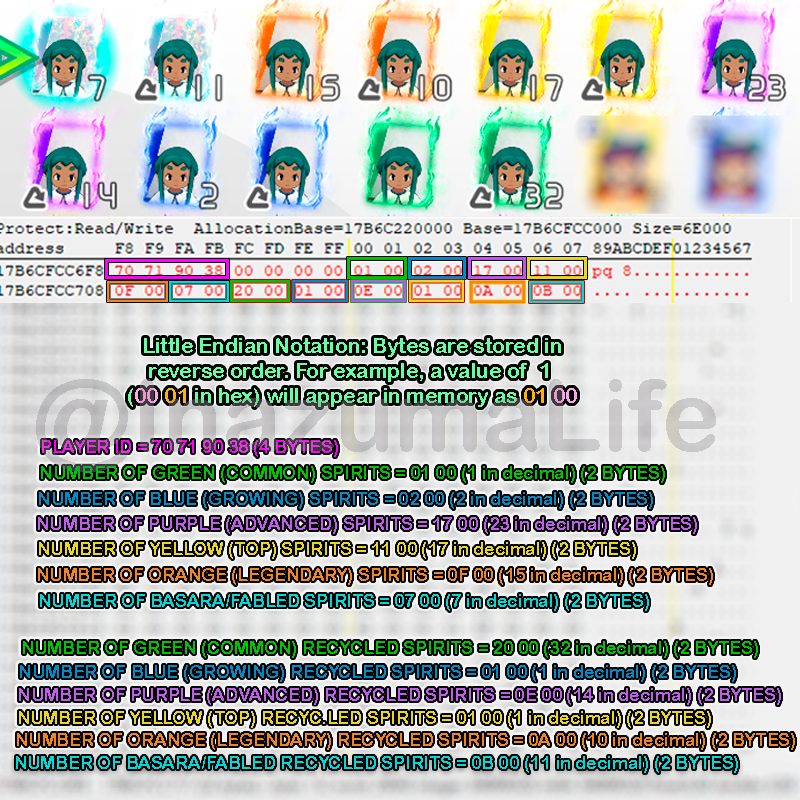
The exact sequence shown in the image is as follows:
- PLAYER ID: The first 4 Bytes (in pink) identify the player. We don't know what these specific values are, but as you’ll soon see, we won't actually need them for this method.
- ESPÍRITUS NORMALES (2 Bytes cada uno):
- Verdes (Común): En el ejemplo,
01 00(1 spirit). - Azules (Emergente):
02 00(2 espíritus). - Morados (Futbolista de Élite):
17 00(23 espíritus). - Amarillos (Estrella):
11 00(17 espíritus). - Naranjas (Leyenda del Fútbol):
0F 00(15 espíritus). - Basara (Diamante):
07 00(7 espíritus).
- Verdes (Común): En el ejemplo,
- ESPÍRITUS RECICLADOS (2 Bytes cada uno):
Justo después de los Basara normales, empieza la misma secuencia para los reciclados:
- Verde Reciclado: En el ejemplo,
20 00(32 espíritus). - Azul Reciclado: Sigue la secuencia tras el verde.
- Morado Reciclado: Sigue la secuencia.
- Amarillo Reciclado: Sigue la secuencia.
- Naranja Reciclado: Sigue la secuencia.
- Basara Reciclado: El último valor del bloque.
- Verde Reciclado: En el ejemplo,
With all this in mind, we can see that the exact structure the spirits follow in the memory is as follows: PLAYER_ID (4 Bytes) + 2 variable Bytes + 00 00 (Separator) + 6 normal spirit types + 6 recycled spirit types. Remember that each spirit amount takes up 2 bytes.
How to search and edit values in Cheat Engine
Now that we know how they are organized, there's no need to search for values one by one. We are going to use an "Array of Byte" scan to find the complete data block for the player we want by searching for the following:
?? ?? ?? ?? ?? ?? 00 00 AA AA BB BB CC CC DD DD EE EE FF FF GG GG HH HH II II JJ JJ KK KK LL LL
What do these values mean?
?? ?? ?? ?? ?? ?? 00 00: Variable values of the Player ID and memory separators that we must ignore during the search.-
ESPÍRITUS NORMALES:
AA AA: Número de Espíritus Verdes (Común)BB BB: Número de Espíritus Azules (Emergente)CC CC: Número de Espíritus Morados (Futbolista de élite)DD DD: Número de Espíritus Amarillos (Estrella)EE EE: Número de Espíritus Naranjas (Leyenda del fútbol)FF FF: Número de Espíritus Basara (Diamante)
-
ESPÍRITUS RECICLADOS ♻️:
GG GG: Número de Espíritus Verdes RecicladosHH HH: Número de Espíritus Azules RecicladosII II: Número de Espíritus Morados RecicladosJJ JJ: Número de Espíritus Amarillos RecicladosKK KK: Número de Espíritus Naranjas RecicladosLL LL: Número de Espíritus Basara Reciclados
Practical Example: Getting infinite spirits step-by-step
Now that we understand the theory, let's move on to the practical part (at last!). In my case, I want to get infinite spirits for Rhine (a player from Diamond Dust). These are the spirits I currently have in my inventory:
- Green Spirits (Common) 1
- Yellow Spirits (Top): 1
- Orange Spirits (Legendary): 1
- All other rarities: 0
Note: It is absolutely necessary to have at least one spirit of that player in your inventory. Otherwise, the method won't work because the data won't be registered in your memory. To do it without having any, you would have to manually add the player IDs—something I might explain in the future 😉

Once we know the amount of spirits we have, we need to open Cheat Engine and do the following:
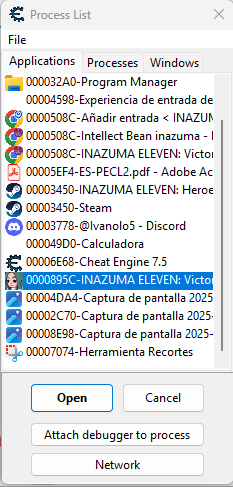
- Click on the "magnifying glass" button (top left) and select Inazuma Eleven: Victory Road from the process list
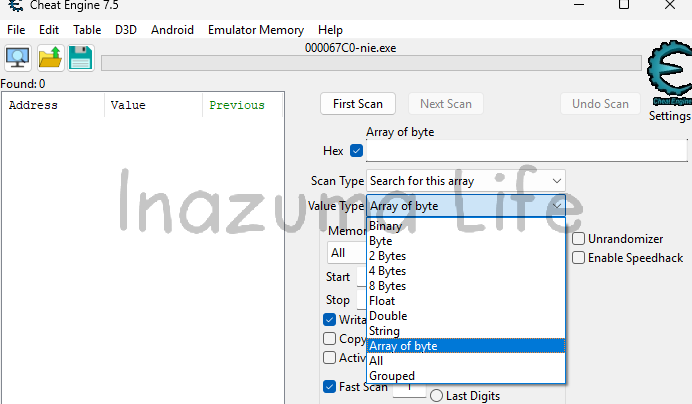
- In the Value Types box, select Array of Byte (which is set to 4 bytes by default when opening the program). You must also check the Hex box located to the left of the search bar where we'll enter the text (right above Scan Type); otherwise, you won't find anything during the search.
-
Once everything is correctly set up, we'll proceed with the search. We'll use the code we discussed earlier as our base:
?? ?? ?? ?? ?? ?? 00 00 AA AA BB BB CC CC DD DD EE EE FF FF GG GG HH HH II II JJ JJ KK KK LL LLFor the search to be effective, we will replace the letters with the actual amount of spirits we currently have, converting them to hexadecimal (2 bytes) and applying Little Endian notation (reverse order). In our practical example, the conversion process would be as follows:
- Green Spirits (AA AA): 1 (decimal) → 00 01 (Hex) → 01 00 (Little Endian).
- Yellow Spirits (DD DD): 1 (decimal) → 00 01 (Hex) → 01 00 (Little Endian).
- Orange Spirits (EE EE): 1 (decimal) → 00 01 (Hex) → 01 00 (Little Endian).
Since we don't have any other spirit types in this case (neither normal nor recycled), we will fill the remaining positions with
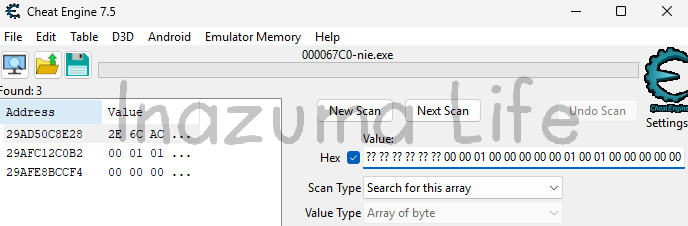
00 00. The final sequence to search for in Cheat Engine looks like this:?? ?? ?? ?? ?? ?? 00 00 01 00 00 00 00 00 01 00 01 00 00 00 00 00 00 00 00 00 00 00 00 00 00 00
-
Una vez buscamos, vemos que nos aparece más de un resultado. Es algo normal al usar comodines (wildcards). Aunque generalmente el primer resultado suele ser el correcto, vamos a ver cómo identificar el nuestro de forma infalible.

Note: En muchas ocasiones solo aparecerá un resultado (si es tu caso, puedes omitir el siguiente paso y pasar directamente al visor de memoria), pero he querido explicar este caso por si os resulta algo más "difícil" de encontrar.
-
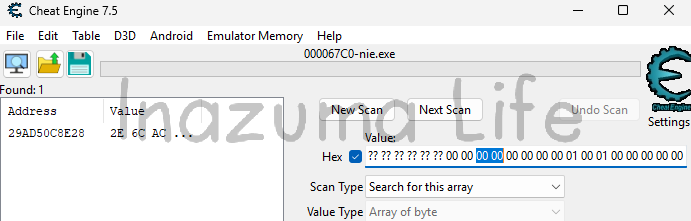
Para lograr reducir el número de resultados y encontrar la dirección de memoria exacta, lo que debemos hacer es invocar un espíritu de los que ya tengas para provocar un cambio en la memoria. En mi caso, he invocado el espíritu verde (común), por lo que hemos pasado de tener 1 a tener 0; es decir, el valor ha cambiado de 01 00 to 00 00.
Una vez hecho ese cambio en el juego, actualizamos el valor correspondiente en el buscador de Cheat Engine y le damos a Next Scan. Ahora, como puedes ver en la imagen, ya solo nos aparecerá un único resultado, que es el que corresponde exactamente a nuestro jugador:

-
Hecho esto, hacemos click en él y pulsamos Ctrl+B (o click derecho -> Browse this memory region); esto nos permite entrar en las "entrañas" del juego y modificar los valores directamente.

-
¿Os acordáis de la estructura que seguían los espíritus en la memoria?
Antes de tocar nada, comparamos lo que vemos en el visor con nuestra plantilla original para saber exactamente qué estamos editando:
?? ?? ?? ?? (ID_JUGADOR) ?? ?? 00 00 AA AA BB BB CC CC DD DD EE EE FF FF GG GG HH HH II II JJ JJ KK KK LL LLEn el visor de memoria, los datos de nuestro jugador se ven de la siguiente forma:
2E 6C AC A4 00 00 00 00 00 00 00 00 00 00 01 00 01 00 00 00... -
Ahora vamos a sustituir los valores of AA AA, BB BB y compañía por los que nosotros queramos. En este ejemplo, queremos tener 999 espíritus normales and 300 de cada reciclado. Para ello, realizamos la conversión:
- Para 999 espíritus: En hexadecimal de 2 bytes es
03 E7, pero como usamos notación Little Endian, lo escribiremos al revés: E7 03. Esto lo aplicaremos desde AA AA until FF FF. - Para 300 espíritus: En hexadecimal de 2 bytes es
01 2C. Al invertirlo para Little Endian, nos queda: 2C 01. Esto se aplica desde GG GG until LL LL.
Una vez editado el bloque en el visor, el código final debe quedar así:
2E 6C AC A4 00 00 00 00 E7 03 E7 03 E7 03 E7 03 E7 03 E7 03 2C 01 2C 01 2C 01 2C 01 2C 01 2C 01
- Para 999 espíritus: En hexadecimal de 2 bytes es
-
Para ver que la cantidad de espíritus se ha actualizado correctamente debemos movernos entre pestañas de espíritus (es decir, por las pestañas de espíritus de cada juego) o salir al menú de Crónicas y volver a entrar; verás que ya tienes 999 de cada rareza y 300 reciclados.



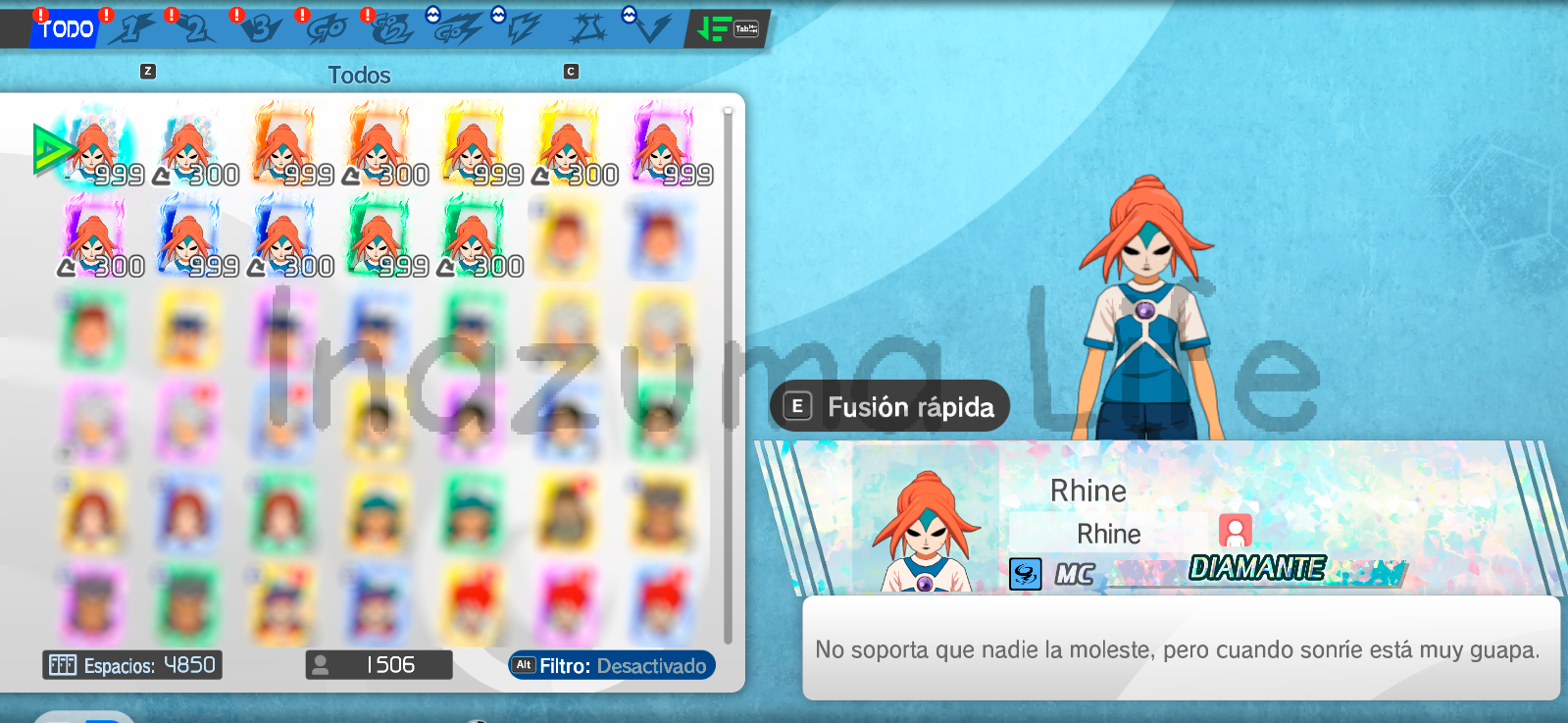
- Now we can try to summon one of them, for example, a Fabled (Basara) spirit, and we can see that it has indeed been saved correctly in our team.
Más Guías y Tutoriales de Cheat Engine en Inazuma Eleven Victory Road
If you enjoyed this method and want to keep exploring the possibilities Cheat Engine offers to modify other aspects of Inazuma Eleven: Victory Road, feel free to check out our other tutorials:
Remember that modifying the game's memory is a powerful tool, but it should be used wisely. Thanks for reading, and see you soon! ⚽⚡

Leave a Reply
 English (UK)
  Español
  Italiano
  Deutsch
  Français
  日本語
日本語
Related Posts