

How to Get Infinite Training Beans in Inazuma Eleven Victory Road (Cheat Engine Guide)
Welcome, Inazuma fan! Today I'm going to show you how to get unlimited Training Beans in Inazuma Eleven: Victory Road using Cheat Engine, so you can increase the rarity of your players without spending hours farming them. In fact, without these beans, no matter how many Spirits you have, you won't be able to upgrade their rarity, making them absolutely essential items
Note: This method is only valid for the PC version and modded Nintendo Switch versions (or emulators)
What is Cheat Engine and how to configure it
If you are new to this, Cheat Engine is a PC program that allows us to view and modify game memory addresses in real time. In this case, it is our essential tool.
To use it on PC with this game, there is a small obstacle: Easy Anti-Cheat (EAC). If you try to open Cheat Engine with the standard Steam game, EAC will block you, and you won't be able to find any values. I won't explain how to bypass it step-by-step here, but let's just say that if you check this guide to disable it and follow the instructions, you will be able to use Cheat Engine without any issues 🤫😉
Additionally, if you are playing on an emulator, you must check this option in the program settings (Edit → Settings) , otherwise, you won't be able to find any values either.
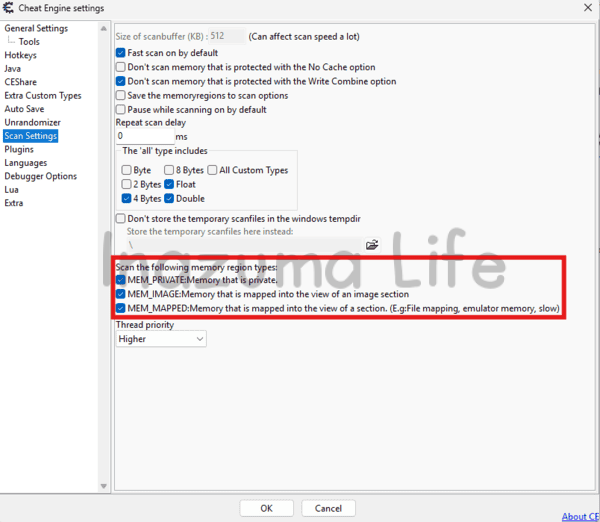
Step 1: Filter Training Beans in Cheat Engine
Once we have everything ready (game open without EAC and Cheat Engine running), let's get to work
The first thing is to open the items menu inside Inazuma Eleven: Victory Road and check how many beans we have. It doesn't matter which beans we choose (Red, Blue, etc.), the only requirement is to have several of them. I recommend having more than 10 to make scanning easier, but it works with fewer as well.
Here's the key to the tutorial: what matters is not the total amount in your bag, but how many beans you have EQUIPPED on your team. Pay close attention to that, because that is the value we are going to search for.
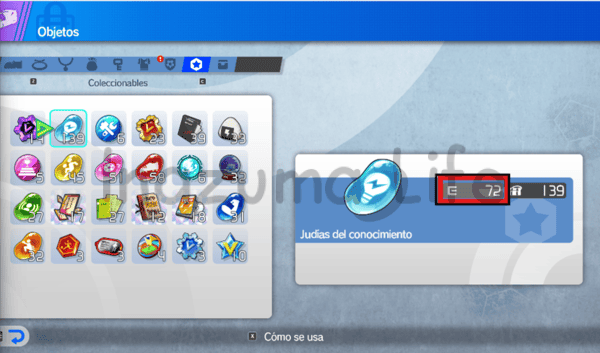
In my save file, I have 139 beans in total, of which 72 are equipped on my players' Abilearn Board. These 72 are the ones we are interested in. So, we do the following:
- Go to Cheat Engine, click on the "magnifying glass" button (top left), and select Inazuma Eleven Victory Road process.
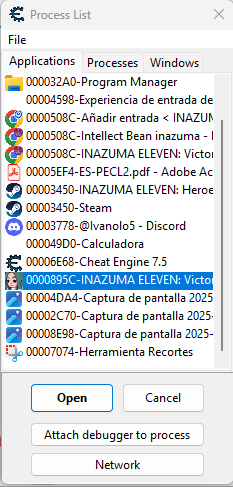
- In the search box, write your value: 72.
- Make sure the Scan Type is set to 4 Bytes (change it in the dropdown if it shows something else) and click New Scan.

Step 2: Refine the search to find the memory address
As expected, hitting search will return thousands of results on the left. We need to filter them.
To do this, go to the team menu inside the game and look for a player who uses this type of bean (in my case I'll use Leila Sway). What I do is "unequip" or spend beans to change that number.

You have two options:
- Go to the items menu and check the exact number (slower because you have to exit and re-enter)
- Do the math mentally: if I had 72 equipped and I remove 12 from a player, now I have to search for 60.
Note that in my case it was a coincidence that I only had that type of bean equipped on a single player, so by removing them I was left with a clean value (60 directly), but this is not usual unless you are starting the game like me.
Note: If you don't have any equipped when starting, simply equip a few and search for that new value.
Once I have my new number (60), I type it into the Cheat Engine search box and click Next Scan.
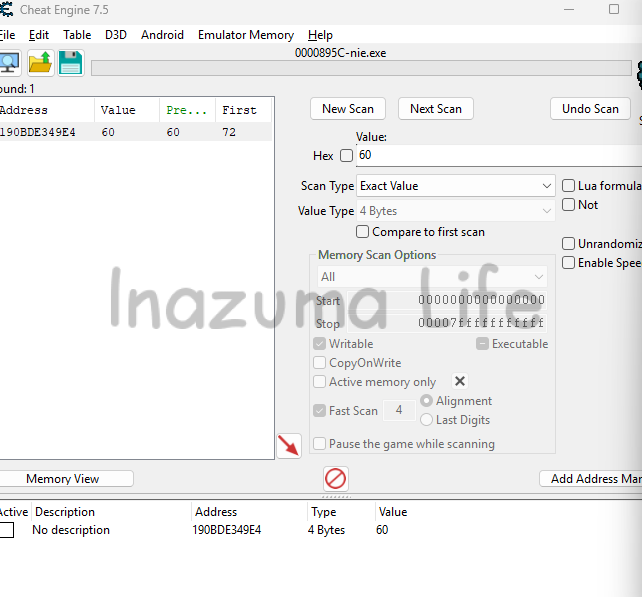
In my case, a single result appeared. If you still see several addresses, repeat the process and filter with Next Scan until only one value remains.
Step 3: Memory Editing (Memory Viewer)
Here is where the magic happens. Once you have the address of the "equipped beans" value, do not change it directly. We will do the following:
- Double-click on the result to move it to the bottom list.
- Right-click on the address and select Browse this memory region (or press
CTRL + B).
The Memory Viewer will open, full of hexadecimal numbers. Don't panic, it's easier than it looks
- The first value you see corresponds to the beans you currently have equipped (in my case
3C, which equals 60 in decimal). - The value of your total inventory is located exactly 4 bytes to the left of that value (in my case
8B, which equals 139 in decimal).
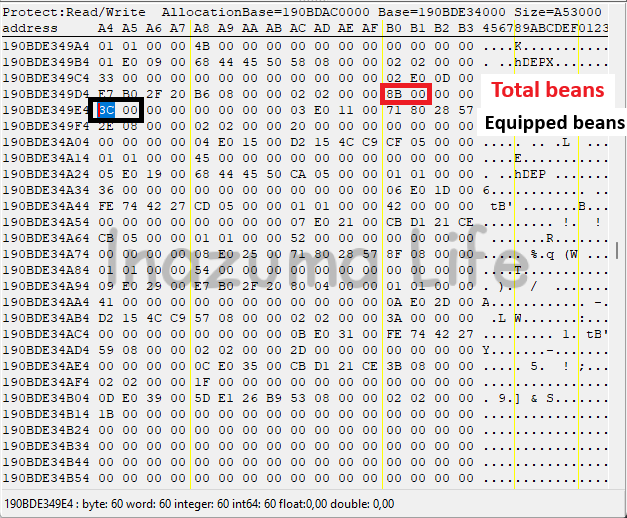
Once we know this, to change the total number of beans, simply double-click on that value (8B), change the value type from 1 byte to 4 bytes (this allows you to enter numbers larger than 255) and type 999 (E7 03 in hex) or whatever amount you desire.

How to get the rest of the Bean types
Surely now you're thinking: "Okay, but do I have to do all this for every type of bean?" Well, you don't.
Before looking at the memory addresses, here is the complete list of available beans and which stat each one improves, so you can identify what you are modifying:
| Item Name | Stat Improved |
|---|---|
| Intellect Bean | Intelligence |
| Kick Strength Bean | Kick |
| Velocity Bean | Agility |
| Acuity Bean | Control |
| Toughness Bean | Physical |
| Steadfast Bean | Pressure |
| Finesse Bean | Technique |
If we analyze the Memory Editor, you will see that the beans are not placed randomly, but follow a structure. In my save file, the distance between them follows this pattern:
- Group 1: The Acuity, Intellect and Velocity beans are separated by 29 bytes each.
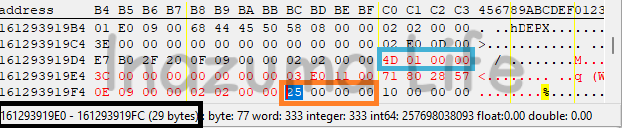
- The "Jump": To reach the next group of beans, adding 29 is not enough. There is a data gap of 197 bytes separating both blocks.
- Group 2: Once you cross that jump, the rest of the beans are again separated by the standard 29 bytes.
I leave you the following image with the full memory map so you can locate your values quickly:
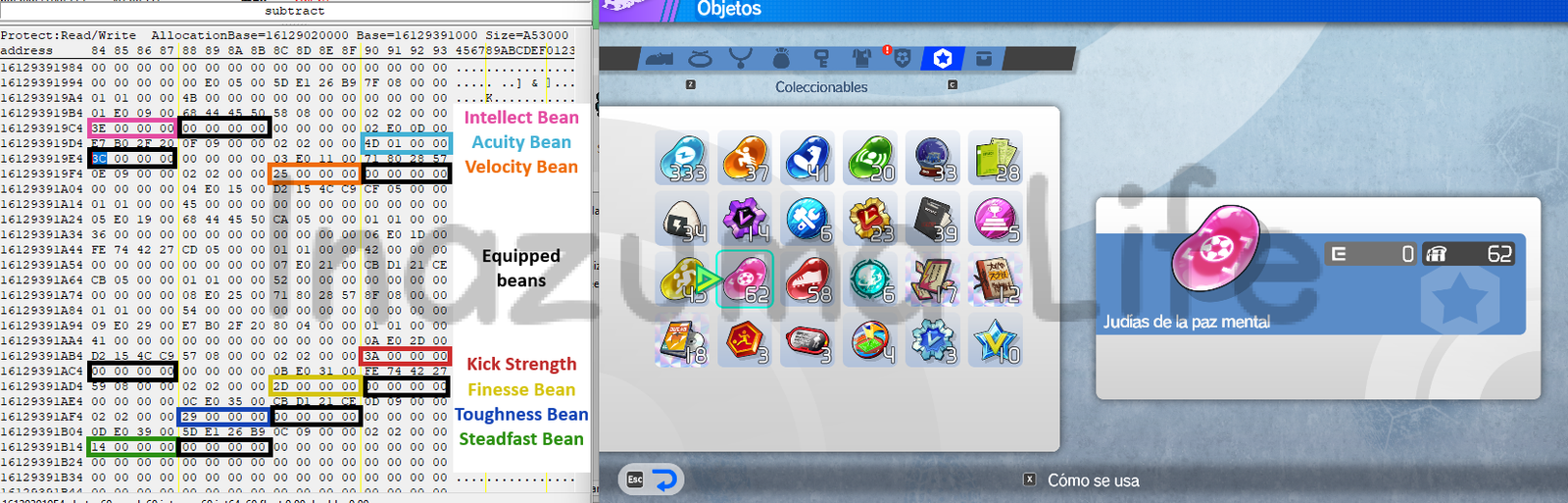
Note: Keep in mind that the absolute position may depend on the items in your inventory, but the relative distance (the 29 bytes between items) is usually fixed in the game's data structure.
More Inazuma Eleven: Victory Road Guides and Cheats
Mission accomplished! Now that obtaining beans is no longer a problem and your inventory is full, it's time to focus on what truly matters: strategy and scouting.
If you want to discover the best players to scout, competitive builds or more tools to get the most out of the PC version, check out our main section with all the guides
I hope this tutorial has helped you save hours of replaying matches. Thanks for reading and see you soon!

-
 testa says:
 the eac bypass does not work
-
yes it does; it works for me. Did u follow the steps from the external website? I mean, the ones right below the download link. Also, did u enable the memory options mentioned in my article? Otherwise, Cheat Engine won't be able to find any memory values
-
-
Fubuki Shirou says:
If you're a complete hexadecimal noob like me, it's worth noting that the way the bytes are written is in the "little endian" way. I plugged my bean numbers into a hexadecimal calculator but could not find the values, until I saw that that same calculator showed two different notations for the hexadecimal code.
For example: I had 693 beans and the hexadecimal calculator said this corresponded to the code 02 B5. However, I could not find 02 B5, only B5 02.
Turns out, that's just a different way of writing it (the so called "little endian" or whatever. I don't know computers.Hope this helps other confused people 🙂
-
Ange says:
can we have a tuto for have Harper Evans without do the story
 testa
testa 
 Fubuki Shirou
  Ange
Ange Leave a Reply
 English (UK)
  Español
  Italiano
  Deutsch
  Français
  日本語
日本語
Related Posts